Changelog
Newest first. When a release needs new scripts, get a redelivery from the Marketplace and replace them in your rezzed object (Updating scripts).
1.2.4 — October 15, 2026 (panel update) latest
Clicky recharges are here, plus your own panel color. A panel update: no new scripts and no redelivery, your 1.2.4 scripts stay as they are. The two HUD fixes below take effect the next time you Build the project.
Clicky recharges: 12x more usage than the free bar
Ran out of Clicky? You can now buy a recharge and keep going: press Recharge at the bottom of the chat.
- Each recharge gives you 12x more usage than the free bar every account starts with.
- A recharge fills the whole bar, and your first one makes the bar 12x bigger for good.
- Buy more than one? The extra recharges are saved and never expire. Use one whenever you want with Use saved recharge, at the bottom of the chat.
- Clicky's usage is a bar at the bottom of the chat, with how much is left beside it. It replaces the weekly usage of the plans and does not refill by itself.
- With the bar empty only Clicky stops; the rest of the panel keeps working. Usage and recharges.
Pick the color of your panel
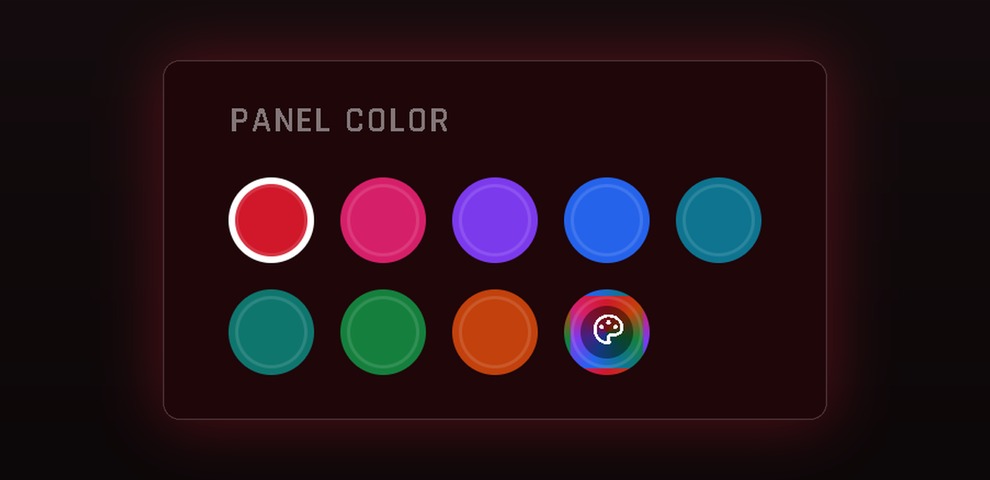
- Choose the color of the panel: 8 ready colors or any color you like.
- In the Classic look, open the ⚙ next to your name. In the New look, open the menu under your name. Look for Panel color.
- Buttons, highlights, tabs, windows, Clicky and even the dark backgrounds follow the color you pick. Green, amber and the red of errors and Delete keep their meaning.
- The color is remembered on this browser and works in both looks. Pick Red to go back to the original.
Clicky handles big jobs better
- Asking for many buttons at once (18 color buttons, for example) no longer leaves some of them empty. When a reply is too long, Clicky notices what was cut and sends it again, and it has more room to work on complex requests.
- It uses the real names of your buttons from the last scan: it no longer creates a function for a button that does not exist (like
LID_19on a HUD that ends atLID_18).
Color Picker on a part of the HUD
- A Color Picker set to color one part of the HUD itself (a letter, a preview) used to color the whole HUD. Now it colors only that part.
- Projects you already made are fixed too: just Build again, no need to open the action.
Actions on HUD parts after linking new parts
- Linking new parts into the HUD changes the link numbers. Actions on other parts of the HUD kept the old number and hit the wrong part until you opened each one and picked the part again.
- Now they follow their part on their own: Re-scan the HUD and Build.
Copy actions
- A button whose actions you deleted (or that you only opened in the New look) now shows up in Copy actions as a free button. Copying into it replaces the empty function and keeps its group. Cloning Functions.
- Copying to several buttons in a row keeps copying from the same function.
- In the Classic look, the ⚙ menu next to your name no longer opens behind the Script memory card.
1.2.4 — September 28, 2026
Demo Mode, a new Color Picker in black and white, a new unpacker, a new look for the panel, and safer targets. Demo Mode and the fixes below need the new scripts: get a redelivery and replace *BUILD, *FUNCTIONS, *TARGETS and the add-ons PBR Manager, Resizer, Conditions & Variables, Events and UI Buttons. After replacing them, build the project again before pressing Finish.
There is no public 1.2.3: its fixes (Finish with Give Items, and items people sit on) are part of this release.
A visual makeover in progress
1Click Maker is getting a new look, one step at a time: the panel first (now in the Hi Enjoy! red), then this documentation, the tutorials and the items you get in Second Life. Until it is done you may still find screens, prints and pages in the old colors. Nothing about how things work changes, only the look.
Demo Mode: a demo in minutes
- A new Demo button in the panel header turns the HUD into a demo: it only works on items with DEMO in the name (
Mila Dress DEMO,Mila Dress (DEMO)). - Your demo item is simply a copy of your product, renamed. No new target, no scan, no Bulk Edit, and renaming works right away, with no rebuild.
- When the switch is turned on, the panel lists the targets your project uses and the name each one needs.
- A customer who tries the demo HUD on a full item gets a clear message in chat, and the item does not change.
- Needs the 1.2.4 scripts in the HUD (
*BUILDand*FUNCTIONS) and in the demo items (*TARGETS). Demo Mode · Demo Version guide.
Color Picker V2, in black and white
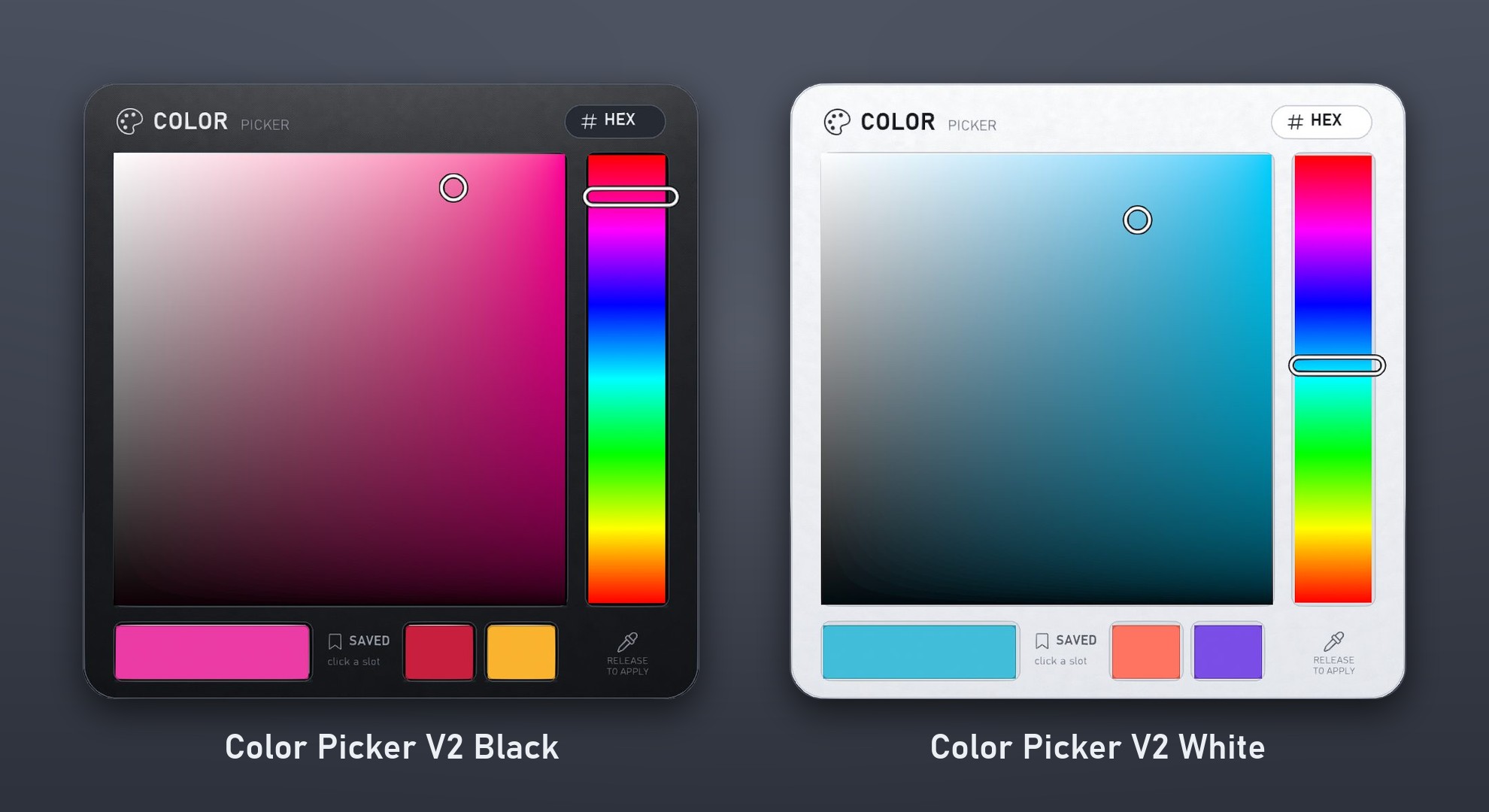
- Two new pickers with the same features: Color Picker V2 Black for dark HUDs and Color Picker V2 White for light ones. Both come in the Color Picker folder of the delivery.
- A cleaner panel: a square for saturation and brightness, a hue bar, markers that show exactly where you picked, and a large swatch with the current color.
- Hold and drag: the markers follow your mouse with no delay, and the color is applied to the item when you release. Click the swatch to apply it again.
- Two saved slots (click one to Apply or Save) and a HEX box that also accepts
255,72,223and<1, 0.28, 0.87>. - Faces you as soon as it is linked (rotation 0) and keeps its color and slots after Reset Scripts. Pickers you already use keep working as before. Color Picker.
A new unpacker, organized in folders
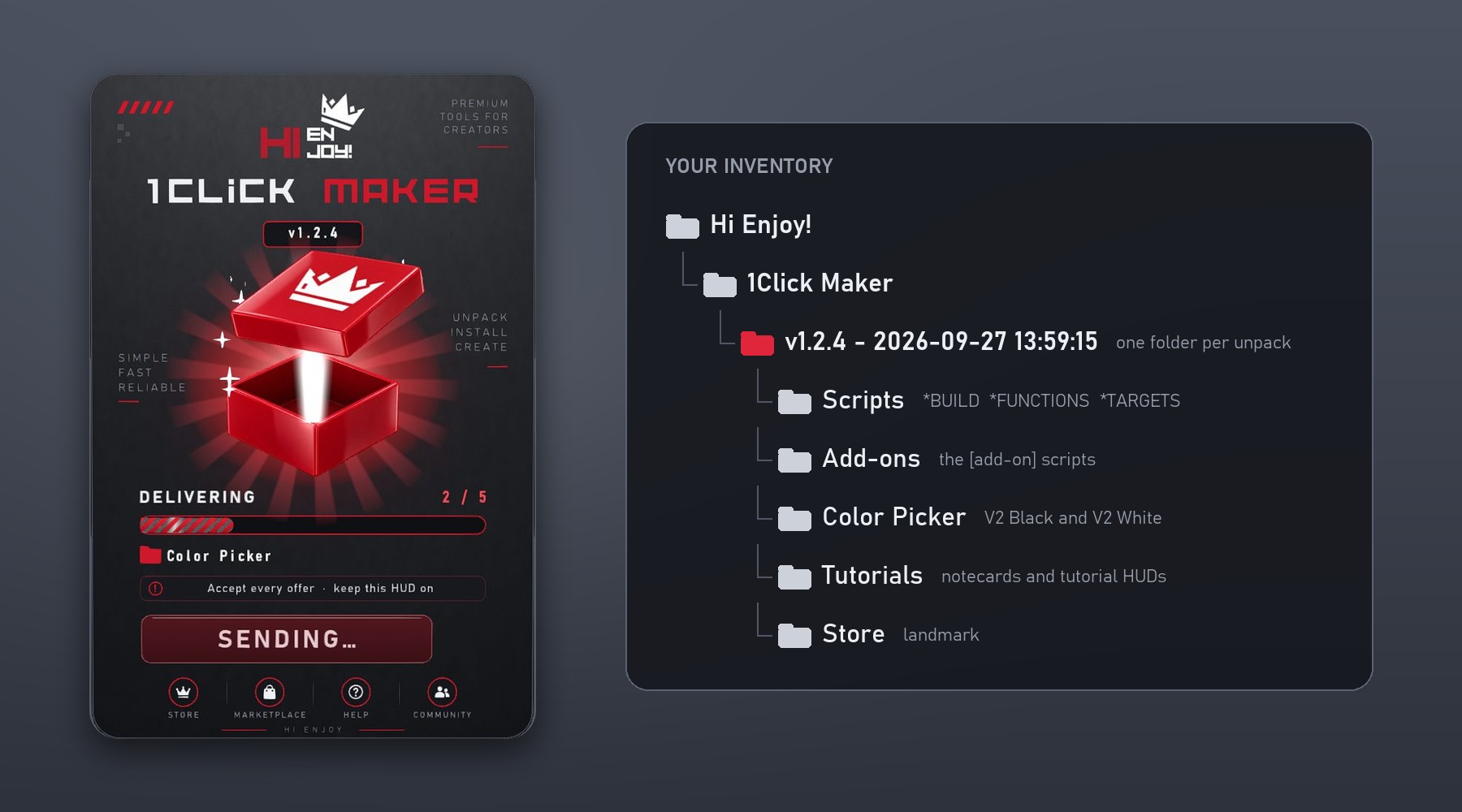
- The redelivery comes in a new unpacker. Wear it (or rez it on the ground) and press UNPACK.
- Everything goes to Hi Enjoy! › 1Click Maker › v1.2.4 - date and time, split into Scripts, Add-ons, Color Picker, Tutorials and Store. No more hunting through one long folder.
- Each folder arrives as a separate offer: accept every one. Second Life does not tell the unpacker what you accepted, so it waits for you to press I ACCEPTED ALL.
- Missed an offer? Press RESEND. Every unpack gets its own folder with the date and time, so a second delivery never mixes with the first.
A new look for the panel
- The panel now uses the Hi Enjoy! red in place of the old green and blue, in both looks. Some prints in this documentation still show the old colors while the makeover goes on.
- A redesigned layout (beta): your buttons on the left, the button's actions in the center, and an inspector on the right that saves as you type.
- Actions are found by typing their name or by category, and Events has its own tab.
- The Classic look is still the default. Press New look to try the new one and Classic look to go back, anytime. The New Look.
Save work with SYNC
- When several targets receive exactly the same actions (the same garment for several bodies, set up one by one), the panel offers, after a save, to show how to SYNC them and to remove the repeated actions for you.
Finish cleans the object again
- With the
[add-on] - Give Items - 1Clickscript inside, Finish used to keep everything in the object's Content: the textures, sounds and notecards you only used while building were delivered to your customer too. - Finish now keeps only the items your Give Items actions deliver and removes the rest, exactly like a product without the add-on.
- With Deliver the whole inventory selected, nothing is removed, as before.
- An object with the add-on inside but no Give Items action is cleaned normally.
- If the object has never been built, Finish keeps everything and asks you to build first, so a mistaken click cannot delete your items.
Chairs, poseballs and anything people sit on
- Sitting on an item no longer produces script errors in your chat (
texture info cannot be accessed for avatars). Before, sitting down was enough to trigger them, without touching the HUD. - All links colour, transparency, glow and the other actions keep working while someone is sitting.
- The panel no longer lists the person sitting as if they were a part of your object, in the buttons list and in the target parts list.
- Furniture with PBR is no longer re-read every time someone sits down or stands up.
Linking new parts into a finished item
- PBR materials and textures no longer jump to other parts when you link a new part into an item, or link the item into something else. Before, turning PBR off and on again (or any PBR action) after the link applied each part's PBR to the part that took its link number.
- Resize no longer gives one part the size and position of another after a part is linked or unlinked, and Root / $THIS resize the main part (before, they did nothing on items with several parts).
- Actions on an item that had a single part keep working after you link more parts to it; they stay on the original part.
- Picking every part one by one no longer turns into All links, so a part linked later is not painted by surprise. Choose All links when you do want future parts included.
Targets and demo HUDs
- A HUD no longer paints itself when an action's target is missing from the Targets list. The action is skipped and Build tells you how many actions need a new target.
- Scan targets no longer drops an item that is in your inventory but still used by your actions: it stays in the list, marked not found in the last scan, and keeps working when you rez it again.
- Bulk Edit offers those missing targets (and older projects' Missing target entries), so you can move their actions in one step.
Other fixes
- Objects that receive commands (with
*BUILDand*TARGETSinside) no longer lose their target channel or their project code ("Project code is not valid"). - Variables and UI buttons survive Reset Scripts. Before, conditions always took the same branch and UI buttons stopped responding until the next Build, which a finished HUD can no longer do.
- Build refuses, with a clear message, a project too big to fit in one object (about 124 KB of actions), instead of losing the last functions silently. Nothing is sent, so the object keeps its previous build.
- Scanning assets no longer lists some items twice.
- The Idle event no longer turns on by itself when a project only uses Standing in Water, and events that do not need it (Attach, Rez, collisions, commands) no longer keep a timer running.
Clicky
- Knows both looks of the panel and gives directions for the one you have open.
- Keeps the language of your conversation, even for short replies; ask "answer in English" to switch.
- Knows Demo Mode and suggests it first when you want to make a demo.
1.2.2 — September 16, 2026
PBR & Linkset Fixes, Clicky and new documentation. Focused on the issues reported most, especially PBR, and introducing Clicky, the assistant built into the panel. No changes to projects are needed; replace the scripts.
WARNING
If your item uses PBR, turn PBR ON before replacing the scripts.
Meet Clicky, your assistant in the panel (experimental)
- Open it from the ✦ button in the bottom-left corner or with Ctrl+I and ask anything about 1Click Maker, Second Life or LSL, in your own language.
- It sees the project you have open, so it can explain what a button does or why something is not working.
- It can build for you: functions, actions, variables, conditions, toggles, events and groups, and it can save, build and scan buttons, assets and targets.
- It tells you which add-on script each feature needs and where to drop it.
- It asks before changing your project for the first time, and every answer can be undone with one click or Ctrl+Z.
- Clicky is an experimental feature, still being tested: check what it builds before you press Build.
- Each project keeps one conversation with Clicky; Clear chat starts over.
- Usage is included with your plan and renews every week. How Clicky works.
New documentation
- A brand-new documentation site, written from scratch: getting started, building a project, PRIM and UI modes, variables and conditions, every action with all of its fields, events, step-by-step guides and troubleshooting.
- Search, screenshots of the real panel, and links from Clicky straight to the right page.
PBR Manager, fully rebuilt
- PBR textures no longer disappear after using other buttons.
- Blinn-Phong faces no longer turn into PBR by themselves.
- Mixing PBR and Blinn-Phong textures on the same product works reliably.
- Color, transparency, glow and the Color Picker stay in sync between PBR and Blinn-Phong.
- Transparency now works on PBR faces.
- PBR On/Off no longer loses or mixes textures; PBR textures can be changed while PBR is off.
- Better performance and no memory errors on objects with many parts.
- Glow now shows on PBR faces too, including Blend and Mask materials.
- Turning PBR ON after changing a PBR material, texture or alpha mode while PBR was OFF works on the first click.
- PBR Alpha Mode (Opaque, Blend, Mask and material default) works on every target with the new PBR Manager.
- PBR works on prims with more than 8 faces and on the root prim of the HUD.
- The false "linkset data is full" warning no longer appears.
Objects with multiple parts
- Parts with apostrophes,
&and other special characters in their names are found correctly. - Part names with extra spaces are recognized.
- Synced items that do not share a part name are left alone instead of hitting the wrong part.
- ALL LINKS color and transparency respect each part's own faces.
- ALL LINKS position and rotation move the whole object instead of stacking its parts.
New
- Give Items action: deliver items from the HUD to the owner in a folder.
- PBR Alpha Mode action.
- Blinn-Phong advanced properties: repeats, offset, rotation and repeats-per-meter per map.
- Prim and button names are sent to Second Life as real text (special characters preserved).
Other fixes
- The Ghost Object (phantom) action turns ON correctly.
- PBR On/Off, PBR Custom and color/transparency also work on the HUD itself (
$THIS). - Messages, URLs and animation names with special characters work as expected.
- Building large projects is more stable.
- When your object in Second Life does not answer, the panel retries on its own and tells you clearly whether it could not connect or did not get an answer in time.
- What's New moved to a single modal in the panel.
1.2.0 — April 1, 2026
PBR Color Fix. PBR colors were subtly lighter than intended; they now match the chosen color. Requires updated scripts.
1.2.0 — March 29, 2026
UI Mode Improvements
- Zoom in and out in UI Mode.
- Smarter positioning: cloned buttons follow the original's pattern, with a new alignment guide line.
- Preview of the button being edited (toggle in the bottom bar).
- One Color Picker can now control multiple targets.
- Keep or remove normal and specular maps in the Blinn-Phong action (requires updated scripts).
- Fix: Color Picker together with PBR no longer causes errors.
If zoom does not work, clear the browser cache with Ctrl+F5.
1.2.0 — March 21, 2026
UI System, Conditions & Variables. A major step forward.
- UI Mode: a 2D canvas to draw buttons on the HUD texture; hundreds of buttons on one prim. Prim Mode and UI Mode can be used together.
- Variables and the Change Variable and Condition actions.
- Link names instead of link numbers: actions target parts by name, so they behave the same after every upload.
- Panel redesigned (about 90%); everything stays in the same place.
- Hold Ctrl while cloning to keep the window open.
- Bulk Edit targets.
- Build confirmation can be skipped for the session.
- Fixes: prims and buttons sorted alphabetically; editing a reordered action opened the wrong entry.
- Availability: UI Mode for PRO; conditions and variables free for now.
1.1.x — December 10, 2025
PBR Custom, Quick Swap and new events
- PBR Custom: full control over PBR textures, with Blinn-Phong in the same action.
- Quick Swap: change textures and materials by clicking the thumbnail.
- Water events: Entered Water, Standing in Water, Swimming Slowly, Swimming Fast, Left the Water.
- Color, Color Picker and Transparency now also affect PBR.
- Removed: Stop walking and Stop running events; use Idle.
1.0.9 — October 20, 2025
Color Picker & Point of Light
- Color Picker object: thousands of colors, two save slots, HEX input.
- Point of Light action.
- New icons in the panel.
- Fixes: scroll bar in Copy Function; Change Color making targets invisible; Transparency turning colors black.
September 12, 2025
Changes in PBR and more
- PBR On/Off action.
- Transparency action, independent from color.
- Asset filter by name.
- Action cards show target, links and faces without opening them.
- New sidebar.
- Fixes: asset image loading; button menu scroll.
August 7, 2025
The big update
- New actions: Position, Resizer, Object Size.
- The Loop action was removed (use Timer + Activate Function).
- Fixes: assets added twice; assets not appearing; stop-all animations/sounds without an active one; action memory updates; lost target references.
- Buttons listed in creation order; extra tips on actions; rewritten documentation; new help HUD; modular script system; much faster button and asset scanning; new tutorial videos.
June 26, 2025
- Select link names with one click instead of typing numbers.
- Delete a group with all its functions.
- Delete all functions at once.
May 28, 2025
- Multi-link actions: apply one action to several links of a target.
May 21, 2025
- New actions: Full Bright, Object Animation (animesh), Delete Object.
- Fix: colored border on functions.
May 20, 2025
- New events: Detach, Rez, Idle, Starting to walk, Stopping walking, Starting to run, Stopping running, Jump, Collide in avatars, Collide in objects.
- New target
$THIS: the button itself, so cloned actions need no target changes.
May 19, 2025
- Function groups.
- Fixes: third-party HUD texture protection; target synchronization.
March 10, 2025 — System launch
First release: project setup, scans for objects, targets and assets, events, functions, actions, memory control, target mirroring, editing finalized projects, project cleanup, auto-save, script memory optimization, cloud storage. Actions: Texture Legacy, Material PBR, Alpha Mode, Sound, Rotation, Messages, Glow, Color, Animation, Detach, Timer, Loop, Active Function.