
Collections & Chances PRO
A collection is what a machine draws from: a list of prizes, the rarity of each one, how often each one drops, and the price per play.
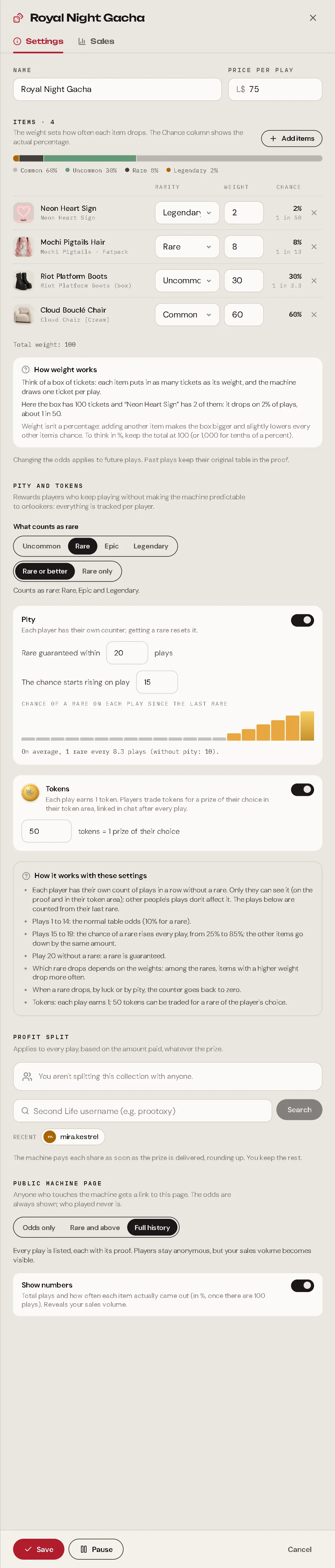
Create a collection
In Catalog → Gacha, press New collection.
Give it a name and a price per play.
Press Add items and choose the prizes. Prizes are products from your hub (they don't need to be on sale at a vendor).
For each item, set its rarity (Common, Uncommon, Rare, Epic, Legendary) and its weight.
Set pity and tokens, profit sharing and the public page, then Save.
Up to 50 items per collection.
Weight, explained simply
The weight decides how often an item drops. The easiest way to think about it:
Imagine a box of tickets. Each item puts as many tickets in the box as its weight. On every play, the machine draws one ticket.
| Item | Weight | Tickets in the box | Chance |
|---|---|---|---|
| Neon Heart Sign (Legendary) | 2 | 2 | 2 out of 100 = 2% (1 in 50) |
| Mochi Pigtails Hair (Rare) | 8 | 8 | 8 out of 100 = 8% (1 in 12.5) |
| Riot Platform Boots (Uncommon) | 30 | 30 | 30 out of 100 = 30% |
| Cloud Bouclé Chair (Common) | 60 | 60 | 60 out of 100 = 60% |
| Total | 100 tickets |
So: chance = weight ÷ sum of all weights.
Weight is not a percentage
This is where people get confused. If you add a fifth item with weight 10, the box now has 110 tickets. The Neon Heart Sign still has 2 tickets, but now it is 2 out of 110: its chance drops from 2% to 1.8%. Every other item drops a little too.
Want to think in percent?
Keep the sum of weights at 100: then each weight is the percentage. Need tenths of a percent (like 0.5%)? Keep the sum at 1,000: a weight of 5 is 0.5%.
Try it
Change the weights, or add an item, and watch the chances move:
Change a weight or add an item and watch every other chance move. That is why the weight is not a percentage: it is a number of tickets.
What the panel shows you
You never have to do this math yourself. The collection editor shows, live:
- the Chance of each item in %, and "1 in N" below it;
- a bar with every item, coloured by rarity, and the total chance of each rarity below it (Common 60% · Uncommon 30% · Rare 8% · Legendary 2%);
- a How weight works box that explains it with your own items: "Here the box has 100 tickets and "Neon Heart Sign" has 2 of them: it drops on 2% of plays, about 1 in 50."
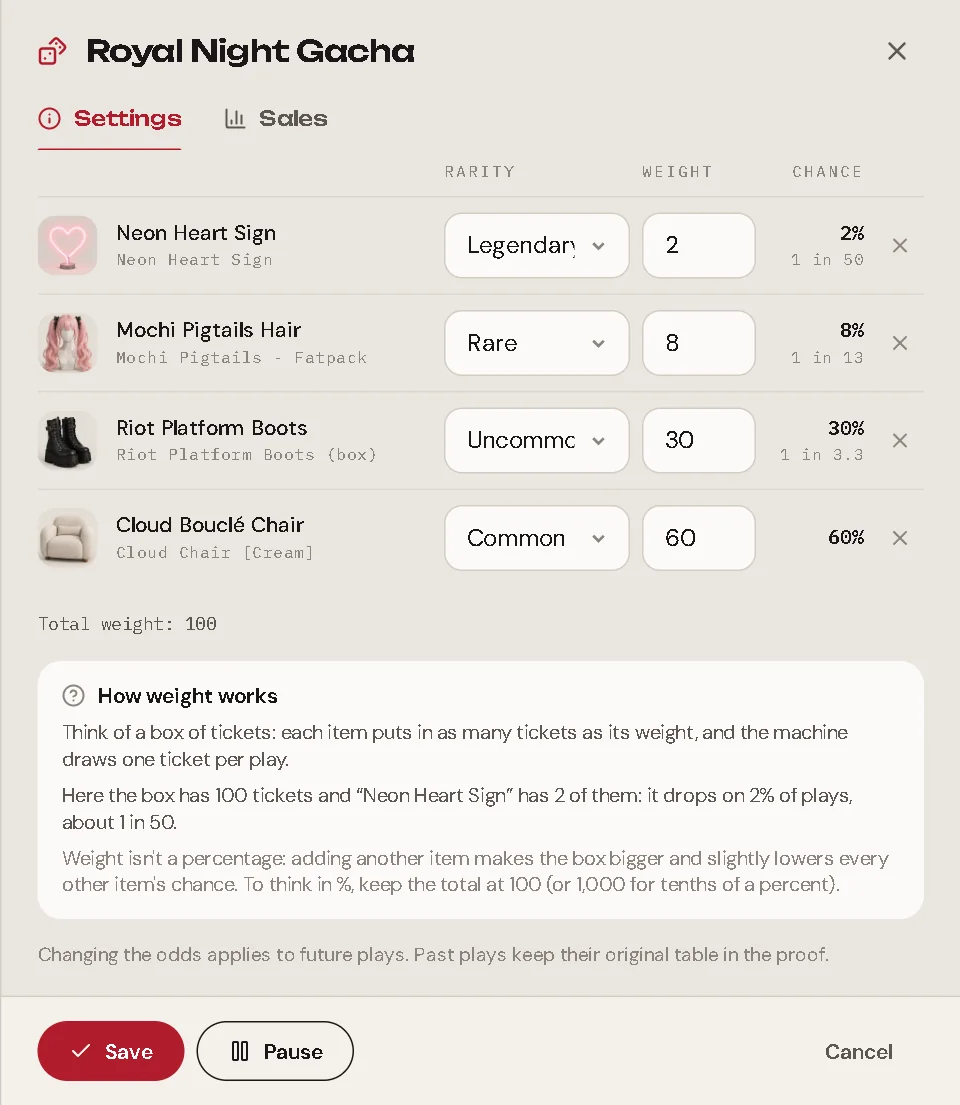
Rules: weights are whole numbers from 1 up, and the sum can go up to 1,000,000.
Rarity
Rarity is a label you choose: Common, Uncommon, Rare, Epic, Legendary. It does not change the chance by itself (the weight does). It is used for:
- the colour of the item on the machine, the public page and the proof (and of the capsule in the Capsule Machine);
- what counts as rare for pity and tokens;
- the Rare and up wall on the public page.
Changing a collection
Changes apply to the next plays. Past plays keep the table they used, forever, in their proof. When the odds change, the public history shows when.
You can Pause a collection: machines using it stop taking payments until you resume.
Profit sharing
Like products, a collection can split its income with up to 5 people. It applies to every play, on the amount paid, whatever the prize (the prize's own product split does not apply: a play is a sale of the collection). The machine pays each share after the prize is delivered. See Profit Sharing for how splits work.
The Sales tab
The collection's Sales tab shows revenue, plays, average per play, players, a chart over time and where they play. It adds Prizes: how many times each item came out in the period, next to its configured chance. (This is private, only in your panel.)