Bulk Edit PRO
Bulk Edit replaces a target with another one in every action that used it. No opening actions one by one.
When you need it
- Demo versions. Clone the project, create a demo target, swap the retail target for the demo one.
- New channel. You re-created a target with NEW (new channel) and the actions still point at the old one.
- Moving a HUD to control a different object with the same link names.
- Fixing a mistake where half the actions point at the wrong object.
How to use it
Make sure the new target has been scanned, so the panel knows it.
Open Targets in the header and click the orange Bulk Edit button.
Select the current target (the one to replace).
Select the new target.
Confirm. Every action that pointed at the old target now points at the new one. Save and Build.
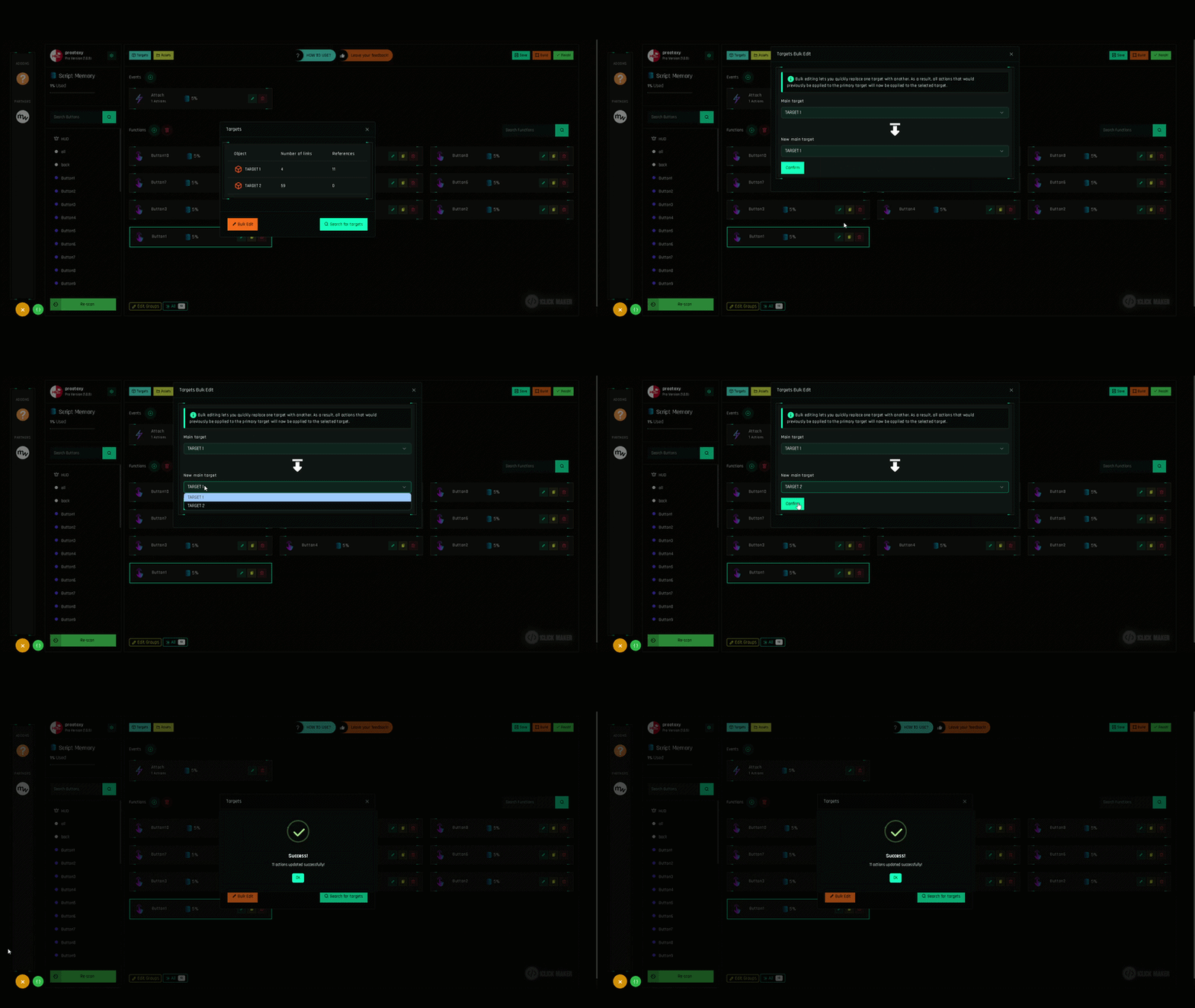
What it changes, and what it does not
| Changed | Not changed |
|---|---|
| The target of every matching action | Link names and faces inside the actions |
| Actions in functions and in events | Assets (textures, sounds) |
Actions that pointed at other targets or $THIS |
Because link names are kept, the new target should have the same prim names as the old one. If a name does not exist in the new target, that action does nothing at runtime; open it and pick the right link.
Undo
Bulk Edit is a normal edit: Ctrl+Z reverts it as long as you have not reloaded the page. Or simply run Bulk Edit again in the opposite direction.