Quick Swap
After cloning a function twenty times, the only thing left is changing the texture in each. Quick Swap lets you do that from the function list in two clicks.
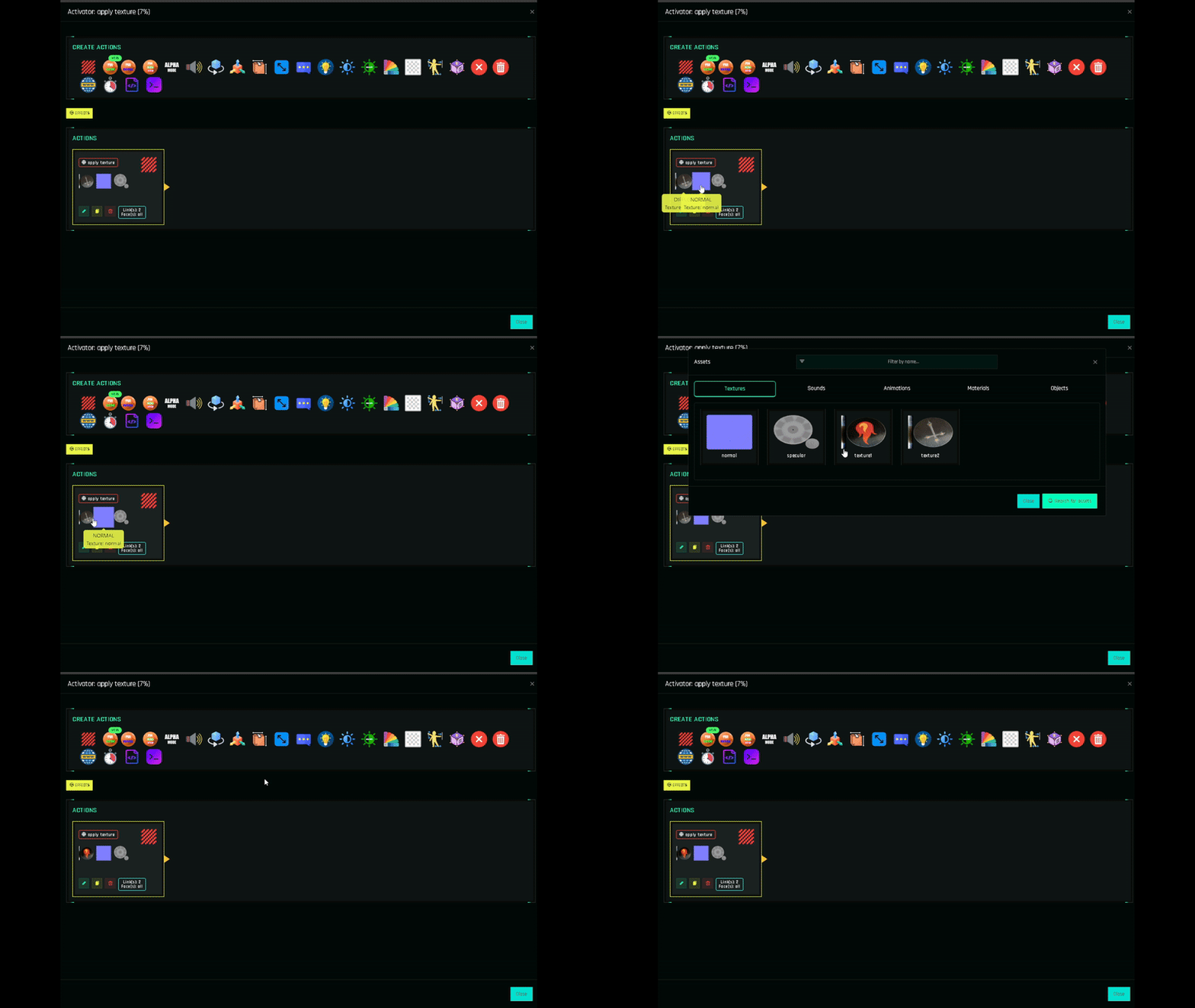
How to use it
Open the function (✏️). Each action card that uses a texture or material shows its thumbnail (or the material badge).
Click the thumbnail. The assets window opens on the right tab.
Click the new asset. The action is updated and the window closes. No Save button inside the action needed; the project is marked as modified.
Repeat for other actions, then Ctrl+S and Build.
What it can swap
| Action | Swappable |
|---|---|
| Blinn-Phong | Diffuse, Normal and Specular textures (each thumbnail separately) |
| PBR Custom | Base Color, Normal, Emissive, ORM textures |
| Material PBR | The material |
Sounds and animations are changed by opening the action.
Workflow: a texture HUD in five minutes
- Configure
btn1with a Blinn-Phong action on the shirt: target, links, faces, texture. - Clone it to
btn2…btn20holding Ctrl. - Open each function and Quick Swap the diffuse texture.
- Build.
See the full walkthrough in Texture Change HUD.