Reopen a Project
Lost the panel link? Want to edit a HUD you finished last month? Need a second version of the same HUD? The *BUILD script has a menu for all three.
Open the menu
Rez the object on the ground (it will not work while attached).
Make sure
*BUILDis inside its Content. If you finished the project, drag it in again from the 1Click Maker folder.Press and hold the mouse button on the object for about one second. A dialog appears.
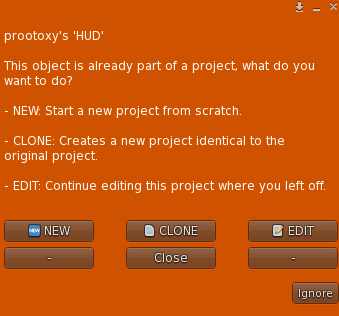
The BUILD menu. It only appears for the owner of the object.
The menu shows up only for the owner of the object, so customers can never open your project.
The three options
📝 EDIT
Reconnects the object to its saved project and prints the panel link again. Use it to:
- recover a lost link,
- keep working on a finished product (drag
*BUILDback in, hold-click, EDIT), - update the scripts of an old product (delete the old ones, drop the new ones, EDIT).
Your project was never deleted by Finish; EDIT just reopens it.
📄 CLONE
Creates a new project that is an exact copy of this one, and connects the object to the copy. The original project is untouched.
This is how you make variations without starting over:
- a demo version of your HUD (clone, then swap targets with Bulk Edit),
- the same HUD for a different product line,
- a safe copy before a big change.
🆕 NEW
Starts a blank project in this object. The previous project still exists in the cloud, but this object no longer points to it.
WARNING
NEW does not delete anything, but it does disconnect the object from the old project. If you only wanted the link, use EDIT.
Where is the project code stored?
*BUILD writes the project code in two places inside the object: the linkset data and the root prim's Description (encoded). That is why the menu can reconnect even after the script was removed and re-added. Do not clear the description of a HUD that has a project, and never set it to !ignore unless you want the scripts to ignore the object.