Demo Mode 1.2.4
Demo Mode is a switch on the project. While it is on, the HUD only works on items whose name contains the word DEMO (or DEMONSTRATION). Everything else in the project stays exactly as you built it.
It is the fastest way to ship a demo: your demo item is simply a copy of your product with DEMO in its name. No new target, no scan, no Bulk Edit.
The short version
- Clone your HUD, press Demo in the header of the clone's panel, confirm, Build.
- Copy your product and rename the copy
… DEMO. Make it no-modify. - Box the demo HUD with the demo item. Done.
The full recipe, with trimming and boxing, is in Demo Version.
Turning it on
The Demo button is in the panel header, in both looks.


Press Demo. A confirmation opens with the targets this project uses: a ✅ next to the ones already named for a demo, a ⚠️ and the suggested new name next to the others.
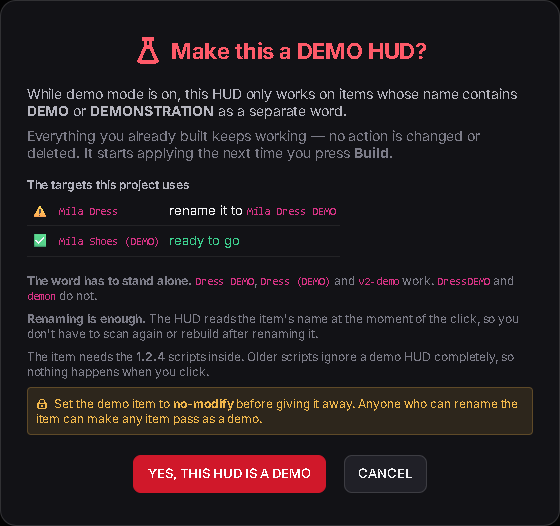
The confirmation lists your targets and tells you which ones still need DEMO in the name. Press YES, THIS HUD IS A DEMO. The button turns into a red DEMO ON.
Save and Build. Demo Mode starts working with this build.
No action is changed or deleted. To turn it off, press the button again, confirm, and Build: the HUD works with any item again.
The name rule
The item obeys the HUD only when DEMO or DEMONSTRATION appears in its name as a word on its own. Upper or lower case does not matter. Spaces and the characters - _ / ( ) [ ] . , + * : separate words.
| Item name | Works? |
|---|---|
Mila Dress DEMO | ✅ |
Mila Dress (DEMO) | ✅ |
Mila Dress v2-demo | ✅ |
[DEMO] Mila Dress | ✅ |
Mila Dress Demonstration | ✅ |
Mila DressDEMO | ❌ the word is glued to another one |
Demonic Dress | ❌ demonic is not demo |
Mila Dress | ❌ |
Renaming is enough. The item checks its own name at the moment it receives the click. After you rename it in Second Life you do not need to scan again, and you do not need to Build again.
What Demo Mode limits, and what it does not
Demo Mode protects the items your HUD controls. It does not change what the HUD does to itself or to the person wearing it.
Limited — only reaches items named DEMO: every action whose Target is a scanned target. That covers Blinn-Phong, PBR Custom, Material PBR, Color, Transparency, Glow, Resizer, Ghost Object, Send Command and every other action sent to a target.
Not limited — runs as usual:
- actions on the HUD itself (target
$THIS); - Message, Sound, Animation, Open URL, Timer, conditions and variables;
- Give Items: remove it from a demo HUD, or it delivers the real items.
When someone clicks a demo HUD while wearing an item without DEMO in the name, nothing changes on the item and its owner reads, in local chat:
This HUD is a demo and only works on items with DEMO in the name. This one is called "Mila Dress".The message shows at most once every 30 seconds, so a customer clicking around does not get spammed.
A product that controls itself
If your product has no separate target (everything uses $THIS), Demo Mode has nothing to limit. Build the demo as its own project with fewer options, or make it expire or delete itself.
Requirements
- Scripts 1.2.4 or newer, in the HUD (
*BUILDand*FUNCTIONS) and in every demo item (*TARGETS). Get a redelivery and replace the scripts. - An item with older
*TARGETSignores a demo HUD completely: nothing happens and no message appears. If a demo "does nothing", check the scripts in the item first. - A HUD with an older
*BUILDbuilds normally but never receives the switch, so it keeps working as a full HUD. Update*BUILDand*FUNCTIONStogether.
Protect the demo item
Make the demo item no-modify
Anyone who can rename an item can make it pass as a demo. Set the demo item to no-modify before you give it away. A no-modify item cannot be renamed by its owner.
The full HUD also works on demo items. That is on purpose: a customer who buys the full version can keep using the demo item they already have.
Demo Mode or a separate demo target?
| Demo Mode | Separate demo target | |
|---|---|---|
| Demo item | A copy of the product, renamed … DEMO | A new object with *TARGETS → NEW, scanned into the project |
| Panel work | One switch | Scan targets, then Bulk Edit every action |
| Rename or add demo items later | Rename in Second Life, nothing else | Scan and edit again |
| Several bodies | Every body copy just needs DEMO in the name | Sync every demo body to the demo target |
| Scripts needed | 1.2.4 or newer | Any version |
Use Demo Mode whenever you can. The separate target is only worth it when you cannot update the scripts, or when your product controls itself. Both are described in Demo Version.